
Best Northern Lights Tracking Apps for Alaska: Alerts, Kp, Clouds & Tips

Chasing the Northern Lights in Alaska is magical, but it also takes planning. The aurora can appear suddenly, vanish quickly, and is never guaranteed. That’s why apps are so important. They give real-time alerts, forecasts, and help you know when to step outside. This article is your complete guide to the best Northern Lights apps. You’ll learn which aurora forecast apps actually work in Alaska, how aurora alerts apps can help you, and what features matter most. I’ll explain how the apps track solar activity, cloud cover, and darkness, all in simple language.
This article may contain affiliate / compensated links. For full information, please see our disclaimer here.
Why Use Northern Lights Tracking Apps in Alaska
Seeing the aurora in Alaska depends on timing, weather, and luck, and using apps is part of the broader process of planning Alaska travel realistically.
Apps help remove the guesswork. They give you real-time aurora forecasts, alerts, and sky conditions.
Forecast websites exist, but apps are faster and easier. With push notifications, you don’t need to check the data every hour. The alert comes straight to your phone when conditions improve.
Apps also combine important information in one place. You can see the Kp index, solar wind data, and the Bz orientation. Many apps also show cloud cover maps, which are critical in Alaska. A strong aurora is useless if the sky is cloudy.
Some apps let you track aurora activity at your exact location. Others allow you to follow multiple spots, such as Anchorage, Fairbanks, or Denali. This helps if you’re moving around during your trip.
Chris and I tried to catch the aurora several times without success before we learned how to do it properly. That’s when we discovered how helpful these apps can be. We share this article to help you plan your own Northern Lights road trip in Alaska.
With the right apps, your chances are much higher, and you can prepare for this adventure better. Also, don’t miss my article onthe top northern lights viewing spots across the state.
Of course, there are amazing guided Northern Lights tours in Alaska, where you don’t need to worry about the forecast or logistics. This article, however, is written for independent travelers who want to experience the aurora on their own. If you prefer guided tours, check out: Fairbanks Northern Lights Tours: Everything You Need to Know.
You might be also interested in my article: Tips for photographing the Aurora in Alaska.

When Can You See the Aurora in Alaska?
The Northern Lights are visible in Alaska from late August to mid-April. The official aurora season in Alaska runs from August 21 through April 21.
Summer is too bright. From late April to mid-August, daylight lasts nearly 24 hours in much of Alaska. Even if the aurora is active, the sky never gets dark enough.
The best months are around the equinoxes — September, October, March, and early April. Solar activity often peaks, and nights are long but not as cold as deep winter.
In Denali, Fairbanks and Interior Alaska, you can often see the aurora several nights a week during the season. On clear nights, a Kp index of 2–3 is often enough.
In Southcentral Alaska, such as Anchorage or the Kenai, stronger activity is needed. Usually a Kp of 4 or higher is best.
The best viewing hours are between 10 pm and 3 am, with midnight often the strongest. Apps can alert you if the aurora appears earlier or later.
Give yourself multiple nights. Even in peak season, clouds or low activity can block your chances. The more nights you plan, the better your odds.
Agnes’ Advice: Planning a winter trip to Alaska? Be sure to prepare well. Check out my detailed winter packing list to know exactly what to bring.

How Aurora Forecasts Work (Plain English)
Aurora forecasts are based on the sun. Solar storms send charged particles toward Earth. When they reach our atmosphere, they create the Northern Lights.
Apps and websites track this activity in real time. The most common measure is the Kp index. It runs from 0 to 9. A higher Kp means stronger aurora, visible farther south. In Fairbanks, a Kp of 2 or 3 can already produce a show. In Anchorage, you often need 4 or higher.
Another key factor is the Bz. This shows the direction of the solar wind’s magnetic field. If it points south, the aurora is stronger. If it points north, activity is weaker.
Solar wind speed and density also matter. Faster winds and higher density increase aurora chances. Apps show these numbers, but you don’t need to be a scientist to use them.
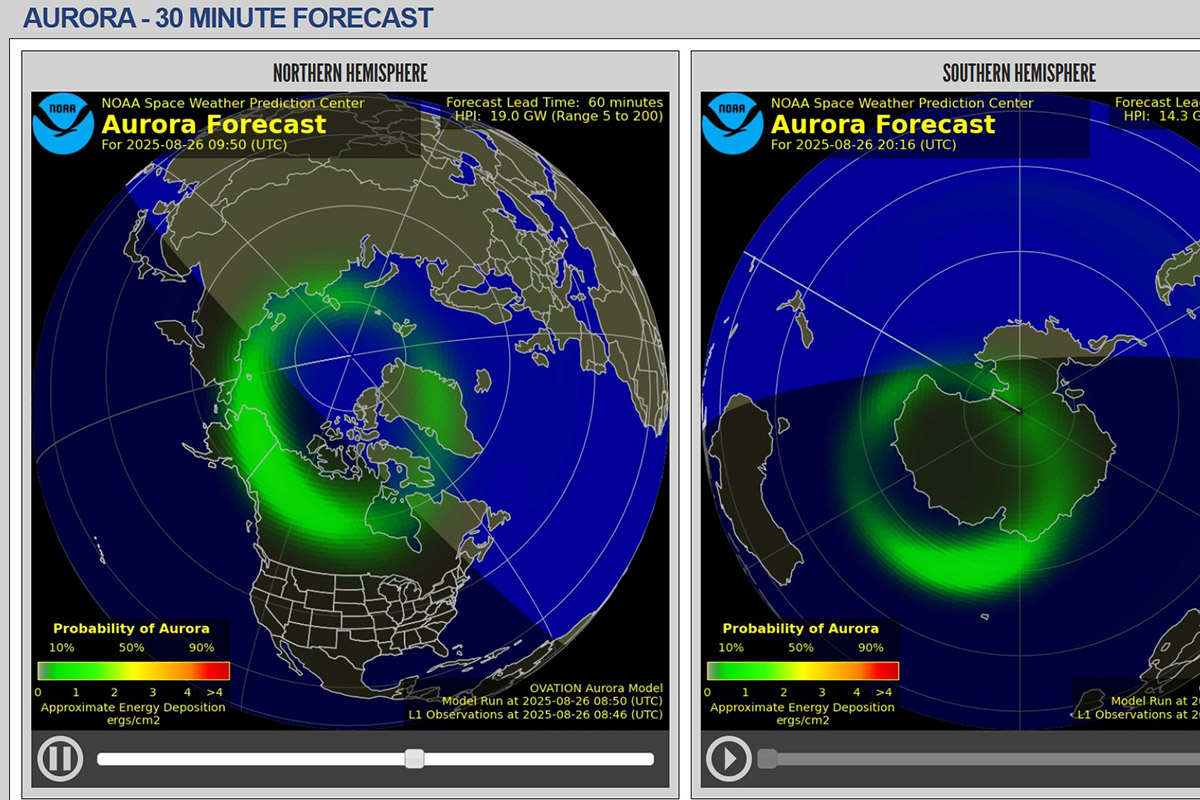
For short-term accuracy, apps rely on the NOAA OVATION model. This forecast shows aurora probability across the Northern Hemisphere for the next 30–90 minutes. It is updated every few minutes.
Apps combine these data points into simple alerts. Many show “chance of aurora” as a percentage. Others let you set thresholds, such as “alert me if Kp hits 4.”
Remember, forecasts are only half the story. Even with strong activity, clouds or bright moonlight can block your view. That’s why apps also include cloud cover maps.
What Makes a Great Aurora App for Alaska
Not every Northern Lights app works well in Alaska. Conditions here are unique, with long nights, fast-changing weather, and remote locations. A good app should do more than show a Kp index.
The most useful apps send push alerts. You don’t want to refresh data all night. Alerts save time and tell you when to step outside.
Cloud maps are just as important as aurora forecasts. In Alaska, clouds often ruin the show. A great app combines solar data with real-time cloud cover so you know if the sky is clear.
Local forecasts matter. Some apps let you set alerts for specific towns like Fairbanks, Anchorage, or Denali. This is better than global apps that only give general data.
Easy design helps. You should see aurora chances, Kp, and cloud cover at a glance. Complex charts are nice, but not always needed.
For advanced users, detailed solar data is a plus. Some apps display Bz, solar wind speed, and density. If you know how to read them, you can predict stronger displays.
Battery life is another factor. Nights in Alaska are long. An app that drains your phone quickly is a problem. Look for options that let you set quiet hours or limit alerts.
The best Northern Lights apps for Alaska are the ones that combine forecasts, alerts, cloud maps, and local settings in one place.

Quick Picks (By Traveler Type)
Not every traveler needs the same type of Northern Lights app. Here are quick picks to help you choose the best fit.
For Beginners
Choose a simple app with clear chances and push alerts. My Aurora Forecast & Alerts is easy to read. It shows the Kp index, cloud cover, and a percentage chance. No need to understand complex solar charts.
For Power Users
Pick an app that gives detailed solar data. SpaceWeatherLive is a favorite. It shows Kp, Bz, solar wind speed, and density. You can set custom alerts for each value. Perfect if you want to dig into the science.
For Locals and Long Stays
Aurora Notify is designed for Alaska. It sends text or email alerts based on Fairbanks and Interior activity. This is helpful if you live here or spend weeks chasing the aurora.
For Travelers Who Like Sharing
Hello Aurora is a fun choice. It includes live reports from other users who spot the lights. If someone nearby sees the aurora, you get notified. Great for travelers who like real-time updates from people, not just numbers.
Each of these apps works, but the best choice depends on your travel style.

Best Northern Lights Tracking Apps For Alaska (2025–2026 Aurora Season)
Here are the best Northern Lights tracking apps and tools to use in Alaska. Each has strengths depending on your needs.
My Aurora Forecast & Alerts (iOS/Android)
One of the most popular aurora apps. My Aurora Forecast & Alerts shows the Kp index, percentage chance, and NOAA OVATION maps. The interface is clean and easy to understand. Push alerts notify you when activity increases. Perfect for beginners who want simple answers without digging into science.
SpaceWeatherLive (iOS/Android)
A powerful app for advanced users. SpaceWeatherLive gives live solar data: Kp index, Bz, solar wind speed, and density. You can set custom alerts for each parameter. Charts show the history of solar activity. Best for travelers who want full control and deeper understanding.
Aurora Alerts / Northern Light Aurora Forecast (iOS/Android)
A straightforward app with real-time monitoring. It offers push alerts when activity rises. Easy to use and popular with travelers who just want to know when to step outside.
My Aurora Forecast Pro (iOS / Android)
This app blends style and depth. You get Kp index, real-time aurora probability, and maps based on NOAA’s OVATION model. It sends push alerts when activity rises. It also includes solar wind data, live webcams, and even tour suggestions for Alaska and beyond. The interface is sleek, giving serious chasers and first-timers just what they need.
Hello Aurora (iOS/Android)
Hello Aurora app mixes forecasts with social reporting. Users can share live aurora sightings, which appear on the map. It helps confirm if the lights are visible in your area. Great for travelers who like real-time community updates.
Aurora Notify (Web + Alerts Service)
Alaska-based service that sends text or email alerts tailored to your location. Especially useful in Fairbanks and the Interior. It is a good backup to standard apps and works even if you don’t check your phone often.
UAF Geophysical Institute Forecast (Website)
The University of Alaska Fairbanks runs one of the most reliable aurora forecasts. It shows daily predictions and Kp levels. Not a mobile app, but an essential tool for Alaska travelers.
NOAA Aurora Forecast Tools (Website)
The NOAA Space Weather Prediction Center provides the OVATION aurora map. It updates every few minutes and shows aurora chances in the next 30–90 minutes. A must-have resource to compare with your app.
Each of these northern lights tracking apps and tools helps you chase the aurora smarter. Many travelers use more than one for better accuracy.

Setup Guide – Get Reliable Alerts (Step by Step)
Downloading an app is only the first step. To make sure you don’t miss the aurora, you need to set it up correctly.
Step 1: Allow Location Access
Most apps work best with your exact location. Turn on GPS so the app can track conditions near you. If you prefer, you can also save favorite spots like Anchorage, Fairbanks, or Denali.
Step 2: Set Alert Thresholds
Choose the Kp level that makes sense for your area. In Fairbanks, alerts at Kp 2–3 are enough. In Anchorage or Southcentral, set alerts for Kp 4 or higher.
Step 3: Turn On Push Notifications
Enable notifications so the app can wake your phone when activity spikes. This saves you from checking all night.
Step 4: Add Cloud Alerts
If your app offers cloud cover maps, set them up. Clear skies matter as much as solar activity. Some apps let you combine aurora activity with cloud forecasts.
Step 5: Use Quiet Hours
To save battery and avoid constant pings, set quiet hours. Pick a window when you want alerts, usually between 9 pm and 3 am.
Step 6: Test Before You Travel
Open the app at home and check if alerts are working. Make sure notifications are allowed in your phone settings. This avoids problems when you’re already in Alaska.
With these steps, your aurora alerts will be reliable, and you won’t miss a chance to see the Northern Lights.
Alaska-Specific Settings That Work
Aurora apps give global data, but Alaska has its own conditions. Setting your app correctly makes a big difference.
Interior Alaska (Fairbanks, Chena, Denali area)
Here the aurora is visible on many nights. A Kp of 2 or 3 is often enough. Set your alerts lower so you don’t miss a weak but beautiful display. One of the top places to enjoy aurora is Chena Hot Springs resort.
Southcentral Alaska (Anchorage, Kenai, Girdwood)
Activity needs to be stronger. Set alerts for Kp 4 or higher. Clouds are common here, so always check the cloud map with your aurora alert.
Far North (Coldfoot, Utqiaġvik, Arctic areas)
The aurora is visible almost every clear night in winter. You may want fewer alerts to avoid constant pings. Focus more on clear-sky notifications. Top places are: Coldfoot, Wiseman, and the Arctic Circle.
Timing Alerts
Darkness is key. In Alaska, the best hours are usually from 10 pm to 3 am. Set quiet hours so alerts only arrive during this window.
Multiple Locations
Many apps let you save several spots. Add your base city, like Fairbanks, plus any side trips, such as Denali or Talkeetna. This helps you compare conditions if you move around.
With the right settings, you won’t be overwhelmed by constant alerts, but you also won’t miss the action.
Maps, Clouds, and Darkness
A strong aurora means nothing if the sky is cloudy or too bright. That’s why maps and darkness checks are as important as solar forecasts.
Cloud Maps
Always check cloud cover before heading out. Many apps include cloud overlays, but double-check with local forecasts. In Alaska, clouds move fast, especially near mountains and coasts. Even a short gap in the clouds can give you a show.
Darkness Windows
The Northern Lights need dark skies. In summer, from late April to mid-August, it never gets dark enough in Alaska. The best season is late August to mid-April. Around the equinox months, September and March, nights are long but not as cold.
Light Pollution
Stay away from city lights. Even in Fairbanks, drive a short distance to darker areas. Apps won’t warn you about light pollution, but it can hide even strong auroras.
OVATION Maps
Many apps use NOAA’s OVATION model. It updates every few minutes and shows the probability of seeing aurora across the Northern Hemisphere. Combine this with your local cloud forecast for the best results.
The bottom line: clear, dark skies matter as much as solar activity. Always use your app’s aurora forecast with cloud and darkness maps to plan smart.
How to Read App Numbers (Without Jargon)
Northern lights tracking apps often show numbers that can look confusing. Here’s what the key ones mean.
Kp Index
This runs from 0 to 9. The higher the number, the stronger the aurora. In Fairbanks, a Kp of 2–3 can bring lights. In Anchorage, you usually need 4 or higher.
Bz
This shows the direction of the solar wind’s magnetic field. When Bz is negative (southward), aurora chances increase. Positive (northward) Bz often weakens activity.
Solar Wind Speed
Faster speeds mean more energy. Values above 400 km/s can create stronger auroras.
Density
This measures how many charged particles are hitting Earth. Higher density often means brighter, more active displays.
OVATION Model
This map shows the probability of aurora in the next 30–90 minutes. Updated every few minutes, it’s one of the best short-term tools.
You don’t need to be a scientist. Just remember: low Kp can still bring aurora in Fairbanks, negative Bz is good, and clouds are always the biggest obstacle.
Battery, Data, and Offline Tips
Aurora chasing often means long nights in cold weather. Cold drains batteries fast. Northern lights tracking apps and alerts also use data. Here’s how to stay ready.
Save Battery
Keep your phone warm. Store it in an inside pocket until you need it. Carry a small power bank. In winter, bring two. Cold can cut battery life by half.
Limit Alerts
Too many alerts waste battery. Set realistic thresholds for your location. For example, Fairbanks works at Kp 2–3. Anchorage needs Kp 4 or higher.
Download Offline Maps
Many aurora apps need data. In Alaska, cell service is weak outside towns. Download offline basemaps before your trip. That way you can still see where you are.
Check Data Use
Solar charts and live maps refresh often. This uses data. If you are on a limited plan, adjust update frequency in app settings.
Bring Backup Lighting
Don’t rely only on your phone flashlight. Carry a headlamp with a red light mode. It saves night vision and doesn’t blind others.
Prepared phones and backups make sure your aurora night doesn’t end too early.
Safety and Etiquette at Night
Aurora chasing in Alaska often means late nights, cold weather, and dark roads. A little preparation keeps you safe and respectful.
- Dress Warm. Temperatures can drop quickly. Wear layers, hats, gloves, and insulated boots. Bring hand warmers if you stay outside for hours.
- Drive Safely. Roads may be icy or dark. Pull over only in safe places, not on highway shoulders. Use marked pullouts or parking areas.
- Lights and Vision. Turn off car headlights when parked. Use low interior lights or a red headlamp. This helps you and others keep night vision.
- Respect Private Land. Do not enter private property, even if it looks like a good viewing spot. Many popular areas have designated parking for aurora watchers.
- Be Quiet and Courteous. Other travelers may be nearby, including photographers. Keep noise low. Don’t shine flashlights into the sky or across cameras.
- Stay Aware. Keep an eye on the time, temperature, and your surroundings. Wildlife, including moose, can appear at night. Give animals space and never approach.
Safety and respect make aurora chasing better for everyone.
Troubleshooting – “App Says Yes, Sky Says No”
Sometimes your northern lights tracking apps say the aurora is active, but the sky looks empty. Here’s why it happens and what to check.
- Clouds. Even strong aurora can’t shine through heavy clouds. Always check cloud cover maps before heading out.
- Moonlight. A bright full moon can wash out weaker auroras. You may still see them, but they look pale.
- Light Pollution. City lights make the aurora harder to see. Drive a short distance away from towns like Anchorage or Fairbanks for darker skies.
- Low Activity. Apps sometimes show rising Kp or Bz, but displays can stay weak. The aurora may appear as a faint gray band instead of green lights. Use a camera — often it shows colors before your eyes do.
- Timing. Activity can spike for only minutes. If you miss the window, the sky may look empty again. Be patient and give it time.
Aurora chasing is never guaranteed. Apps improve your odds, but conditions on the ground matter most.

Final Thoughts
Seeing the Northern Lights in Alaska is a dream for many travelers. Apps won’t guarantee success, but they make a big difference. They give you alerts, forecasts, and cloud maps so you can be in the right place at the right time.
Chris and I learned this after many failed attempts. Once we started using northern lights tracking apps, our chances improved, and so did our planning. With the right tools, you can avoid wasted nights and enjoy the thrill of seeing the aurora dance across the sky.
Use at least one simple app for alerts and one detailed app for deeper data. Combine them with local forecasts and darkness maps. Give yourself several nights, and always stay safe while chasing.
With the right preparation, your chances of seeing the Northern Lights in Alaska are much higher. And when the sky finally lights up, it will be an unforgettable moment.
Do You Like It? Pin It For Later!


This is such an excellent guide! I’ve never seen the Northern Lights but would love to one day here in northern Europe. Your tips on what apps to choose breaks the info down so simply; I also enjoyed reading the troubleshooting section, it really is helpful for a beginner like me. I don’t know whether I will make it to Alaska but I feel prepared should I ever come to visit to see the Northern Lights!